title: "Locale" sidebar_position: 12
Locale
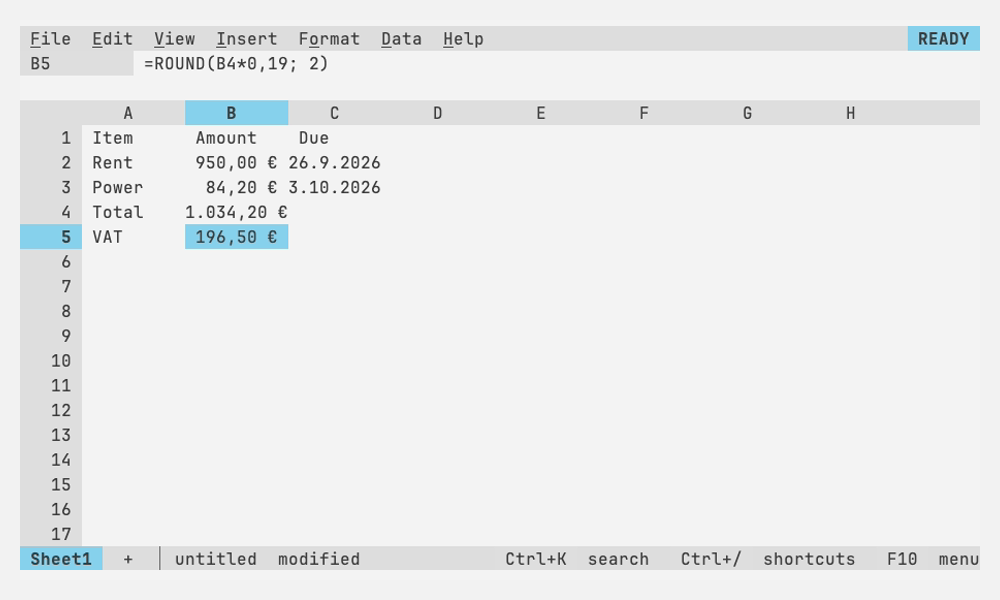
A file's locale says how its numbers, dates, currency and formulas are
typed and shown, as File > Settings > Locale does in Google Sheets. In
German (Germany) a sheet shows 1.234,56 € and 26.9.2026, takes
1,5 as a number, and formulas separate their arguments with ;:
=ROUND(A1*1,19; 2).
Choosing one
File > Settings > Locale lists the locales with a sample of each; type
a language, country or tag to narrow it, Enter picks. The first entry,
Default, follows the locale setting,
which new sheets use and which reads LC_ALL, LC_NUMERIC or LANG
(de_DE.UTF-8) when nothing sets it. A locale picked here is saved in
the file, marks it modified and undoes with Ctrl+Z.
| Tag | Locale | Number | Date | Currency |
|---|---|---|---|---|
en-US |
English (United States) | 1,234.56 | 9/26/2026 | $1,234.56 |
en-GB |
English (United Kingdom) | 1,234.56 | 26/9/2026 | £1,234.56 |
en-CA |
English (Canada) | 1,234.56 | 2026-09-26 | $1,234.56 |
en-AU |
English (Australia) | 1,234.56 | 26/9/2026 | $1,234.56 |
de-DE |
German (Germany) | 1.234,56 | 26.9.2026 | 1.234,56 € |
de-CH |
German (Switzerland) | 1’234.56 | 26.9.2026 | CHF 1’234.56 |
fr-FR |
French (France) | 1 234,56 | 26/9/2026 | 1 234,56 € |
fr-CA |
French (Canada) | 1 234,56 | 2026-09-26 | 1 234,56 $ |
es-ES |
Spanish (Spain) | 1.234,56 | 26/9/2026 | 1.234,56 € |
es-MX |
Spanish (Mexico) | 1,234.56 | 26/9/2026 | $1,234.56 |
it-IT |
Italian (Italy) | 1.234,56 | 26/9/2026 | 1.234,56 € |
pt-BR |
Portuguese (Brazil) | 1.234,56 | 26/9/2026 | R$ 1.234,56 |
pt-PT |
Portuguese (Portugal) | 1 234,56 | 26/9/2026 | 1 234,56 € |
nl-NL |
Dutch (Netherlands) | 1.234,56 | 26-9-2026 | € 1.234,56 |
sv-SE |
Swedish (Sweden) | 1 234,56 | 2026-09-26 | 1 234,56 kr |
da-DK |
Danish (Denmark) | 1.234,56 | 26.9.2026 | 1.234,56 kr. |
nb-NO |
Norwegian (Norway) | 1 234,56 | 26.9.2026 | kr 1 234,56 |
fi-FI |
Finnish (Finland) | 1 234,56 | 26.9.2026 | 1 234,56 € |
pl-PL |
Polish (Poland) | 1 234,56 | 26.9.2026 | 1 234,56 zł |
cs-CZ |
Czech (Czechia) | 1 234,56 | 26.9.2026 | 1 234,56 Kč |
ru-RU |
Russian (Russia) | 1 234,56 | 26.9.2026 | 1 234,56 ₽ |
tr-TR |
Turkish (Türkiye) | 1.234,56 | 26.9.2026 | ₺1.234,56 |
ja-JP |
Japanese (Japan) | 1,234.56 | 2026/9/26 | ¥1,234.56 |
zh-CN |
Chinese (China) | 1,234.56 | 2026/9/26 | ¥1,234.56 |
Dates show day and month without leading zeros, as en-US's do, so most fit a default column; ISO dates keep theirs. Spaces in numbers are no-break spaces, so a number never breaks across lines; when typing one, an ordinary space does.
What follows the locale
- Typing. Numbers, percentages, currency and dates are read the
locale's way:
1.234,5,12,5 %,12,50 €and26.09.2026in German. A date of numbers follows the locale's order (day first in most of Europe, year first in Japan and Sweden);2026-09-26, month names in English (26 Sep 2026) and times (14:30) read the same everywhere. What isn't a value in the locale stays text:$5is text in German,9/in British English.26/ 2026 - Showing. Automatic and every number format use the locale's decimal and thousands separators. Currency, Date, Time and Date time (Format > Number) show the locale's symbol and order; a custom format keeps its own symbols and order, only its separators follow the locale, as in Sheets.
- Month and day names.
mmm,mmmm,dddandddddin a format show the locale's language (Sa 26. Septemberin German), in the form a date with its day takes where the language has one (Polish26 września 2026, butwrzesień 2026);AM/shows 午前 and 午後 in Japanese and 上午 and 下午 in Chinese. A format tagged with a locale as Excel writes them (PM [$-407]mmmm) shows that locale's names. Dates typed with the locale's month names (26. Okt. 2026) are read as dates too. - Formulas. Where the decimal separator is a comma, arguments are
separated by
;and the values of an array's row by\:=IF(A1>1,5; "yes"; "no"),={1\2;3\4}. Function names stay in English, as in Sheets. The formula bar, editing a cell and the function hints (ROUND(value; [places])) all use the locale's form, as do formulas in conditional formatting, data validation and filter conditions. A formula that doesn't parse says so in the locale's syntax:Expected ; or ) in ROUND. - Filters and text conditions. A filter's list of values shows them
as the sheet does (
1.234,50), and conditions on text (contains, starts with, is exactly) test the text the locale shows, in filters and conditional formats alike, so their values are kept as typed. - The clipboard and CSV files. Copying writes numbers with the locale's decimal separator and pasting reads text the locale's way. CSV files are read and written in the locale too.
- The status line. Sum and Avg of the selection.
What doesn't
The file stores everything the same way in every locale, so a sheet
opens with the same values wherever it's opened: entries as typed in
en-US (1,234.5, 09/, =ROUND(A1*1.19, 2); see
the file format). Switching the locale redraws
the sheet and changes no value. Functions compute the same everywhere
too: VALUE("1,5") and TEXT(A1, "0.00") read and write en-US's form
in any locale, and macros and their API
set and read entries in en-US's form.
Excel files are downloaded with the locale's
Currency, Date, Time and Date time formats, tagged with it as Excel
writes them (#,##0.00\ [$€-407], [$-407]d.m.yyyy), so Excel shows
them as the sheet does. Opened in a sheet of the same locale they are
those formats again; in another they keep their symbol and order as
custom formats.