title: "Files" sidebar_position: 1
Files
Spreadsheets save as .012 files: JSON with one line per cell, every
sheet in one file. Other formats come in through File > Import, File >
Open or the command line (012 sales.xlsx), and go out through File >
Download.
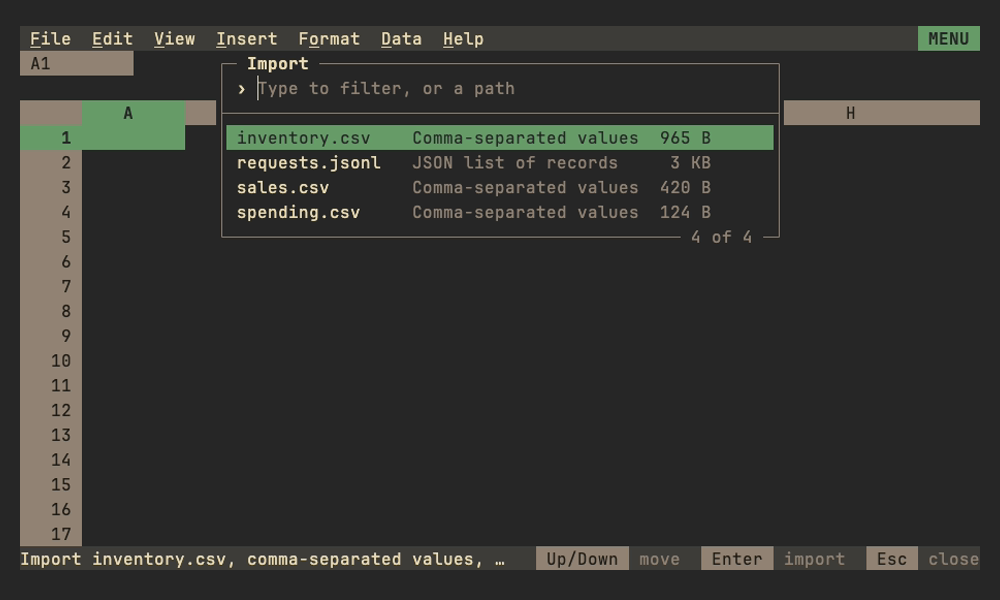
Import and download
Imports run in the background with a progress bar; Esc cancels. Saving
an imported sheet asks whether to save it as a .012 file or download
it back in its format.
| Format | Import | Download |
|---|---|---|
| CSV, TSV | Delimiter (, ; tab |), UTF-8 BOM, UTF-16 and Windows-1252 detected; entries become numbers, dates, currency and percentages as if typed in the sheet's locale (; wins a tie there when it has a decimal comma), or with the other decimal separator when the file's numbers are written that way; formulas stay text |
Values as shown in the locale, of the sheet shown, as Sheets' Download does, CSV with ; between fields where the locale has a decimal comma; a selection of whole columns or rows downloads their data, not a million blank lines |
Excel .xlsx |
Every sheet, with formulas, formats and most of what a sheet holds: see Excel files | The same |
| SQLite | Pick a table or view, or type a query; a header row names the columns | The sheet shown or the selection as a table, first row as column names; a table of that name is replaced |
| Parquet | Every column, with dates, timestamps, times, decimals in their places and intervals as durations; lists joined with commas | |
Lotus 1-2-3 .wk1, .wks |
Numbers, labels with their alignment, formats, column widths, formulas translated (references, operators, @SUM, @AVG, @IF, @ROUND, @PMT and 60 more) or kept as values |
|
JSON .json, .ndjson, .jsonl |
A list of records (or records one after another, as NDJSON): keys become the header row, numbers, booleans and text keep their types, nested lists and records are their text | The sheet shown as a list of records named by its first row, numbers as numbers |
Nushell .nuon |
A nushell table with its types: file sizes, durations and dates become numbers in the Size, Duration and Date time formats; see Nushell types | The sheet shown as a nushell table, first row as column names, types kept by the cells' formats |
Web page .html |
The sheet shown as a page in 012's look, for someone without 012: see Web pages |
CSV, TSV, JSON, NUON and HTML downloads hold the rows a filter shows, as Sheets copies a filtered range; XLSX keeps every row, the hidden ones hidden.
Formats other than XLSX import as one sheet named after the file (or the SQLite table). Formats that keep no column widths (all but XLSX and 1-2-3) have their columns fitted to the header and the first 200 rows, at most 30 characters wide, as are tables read from standard input. A file can also be followed instead, its table in a linked region that takes in new rows as the file grows or is rewritten: see Following files. A Parquet file or SQLite table too big to import links as a source, read in place. A table can also come in on standard input, and go back out on standard output: see Pipelines.
File > Import asks where the data goes, as Sheets' Import location does (a new, empty spreadsheet is simply replaced):
| Location | Does |
|---|---|
| Insert new sheet(s) | Adds the file's sheets after the sheet shown. A name already taken gets a number (Sales 2) and the file's formulas follow it; named ranges come along unless their name is taken. One undo step, and the spreadsheet stays the file you're editing |
| Replace current sheet | Puts the data in place of the sheet shown, keeping its name and position, so formulas and named ranges that read it read the new data. One undo step. Not offered for .xlsx, which holds several sheets |
| Replace spreadsheet | Opens the file instead, as File > Open and the command line do, asking first when there are unsaved changes |
Replacing the current sheet keeps the charts that fit the new data. A chart that drew a whole table is re-pointed to the table the file has at the same corner when it has as many columns (rows for a chart by row), so last month's chart draws this month's rows; a chart of part of a table, or of whole columns or rows, keeps its range. A chart whose table now has other columns, or whose range is empty, is removed. The context line lists the removed charts first, then which were re-pointed and which kept their range, and undo brings the removed ones back.
Size. A sheet is 1,048,576 rows by 16,384 columns (A to XFD), as in
Excel. Imports keep at most max-cells cells (Configuration,
ten million by default, a few hundred MB): whole rows, as many as fit, and
the context line says how many rows were left out, e.g. only the first 833,333 rows fit in max-cells (10,000,000 cells); 12,000 rows left out.
Data past the grid's edges is left out the same way. WK1 files keep their
own 8,192 by 256. See Bounds of support for speeds.
Web pages
A web page download is one .html file that needs nothing else: its
fonts (JetBrains Mono), styles, charts and a few lines of script are in
it, so it opens offline and can be mailed or put on any web server. It
draws the sheet as 012 does: column letters and row numbers, each cell's
text as the grid shows it at its column's width, with its bold, italic,
alignment, wrapping, borders, merges, row heights, notes (the ▝ mark,
the note as its tooltip), tables' header rows and bands, and what
conditional formats and validation show (fills, color scales, data
bars, icons, checkboxes, dropdown marks). Charts float over the cells
at their corner, in their frames, drawn as SVG: shapes rather than
pixels, sharp at any zoom. The colors are the 16 ANSI colors of 012's
reference palettes, dark or light as the reader's system prefers.
Clicking a cell, or moving with the arrow keys, puts the pointer on it: the name box shows its address and the formula bar what was typed in it, a formula rather than its value. A page draws at most 200,000 cells, blank ones included, and says on standard error or the context line how many rows it left out.
012 export also writes a range as a page, or one chart alone with
--chart (Scripts).
More
| Page | For |
|---|---|
| Excel files | What comes in from and goes out to .xlsx |
| Saving | Atomic saves, overwrite checks, unsaved work under 012 serve |
| Following files | Linked regions that follow a file as it grows or is rewritten, like tail -f |
| Linked sources | Parquet files and SQLite tables too big for any grid, read in place on a tab of their own, with formulas and pivot tables streaming over them |
| The .012 format | The JSON format, its versions and fields |
| Scripts | 012 get, set, recalc and export: workbooks read and changed without the screen |
| Diff and merge in git | 012 diff cell by cell, and git's diff and merge drivers for .012 files |