title: "Serving over SSH" sidebar_position: 3
Serving over SSH
012 serve runs an SSH server that gives every session its own 012, in
the client's own terminal, on the files of one directory. It's for
reaching your sheets from another machine or a tablet with an SSH app,
without installing anything there, and for working on one workbook
together: sessions that open the same file share it, each with its own
cursor, and every change reaches the others as it's made
(Sharing a workbook).
012 serve ~/sheets                 # serve ~/sheets on 127.0.0.1:2312
ssh -p 2312 localhost              # from this machine, on a new sheet
ssh -t -p 2312 localhost budget.012   # opening budget.012 from ~/sheets
ssh -t -p 2312 localhost @standup     # joining the named room standup
A file name after the host opens that file, as 012 budget.012 does
locally: a .012 sheet, a new sheet to be saved under that name when
there's no such file, or a file to import (data.csv). A name starting
with @ joins a named room instead. It must be one word (quote a name
with spaces twice: ssh -t host "'my book.012'") and needs -t, since
ssh only asks for a terminal on its own when there's no command.
012 serve [--listen addr] [--authorized-keys file] [--host-key file]
          [--idle-timeout 30m] [--max-sessions 8] [--share edit|view|off]
          [--log file] [--otlp url] [dir]
| Flag | Default | What |
|---|---|---|
dir |
. |
The served directory. Sessions open, save, import and download only inside it |
--listen |
127.0.0.1:2312 |
Address to listen on. Loopback only unless you change it |
--authorized-keys |
~/ |
Public keys allowed in, in OpenSSH's format |
--host-key |
<config dir>/ |
The server's key, generated on first run |
--idle-timeout |
30m |
End a session after this long without input, keeping its unsaved changes; 0 never does |
--max-sessions |
8 |
Sessions at once; more are turned away with a message |
--share |
edit |
Sessions opening the same file share it: edit, everyone edits; view, one writes and the others follow; off, each session gets a copy of its own |
--log, --otlp |
off | Telemetry, as for the app (Observability) |
The config directory is os.UserConfigDir(): ~/ on macOS, ~/ on Linux. On start, 012 prints the served
directory, the address, the host key's fingerprint and the command to
connect.
Setup
-
Put the public keys that may connect in an authorized_keys file. Your own
~/works, or keep a separate one for 012:.ssh/ authorized_keys cat ~/.ssh/id_ed25519.pub > ~/.config/012/authorized_keys chmod 600 ~/.config/012/authorized_keys 012 serve --authorized-keys ~/.config/012/authorized_keys ~/sheets -
Connect with
ssh -p 2312 host. The first time, check the host key fingerprint ssh shows against the one 012 printed, or add the key toknown_hostsyourself fromssh_host_ed25519_key.pubnext to it. -
To reach it from another machine, prefer keeping 012 on loopback and tunnelling through the machine's own sshd (
ssh -L 2312:127.0.0.1:2312 host, thenssh -p 2312 localhost), or a private network such as Tailscale with--listen 100.x.y.z:2312. Listening beyond loopback prints a warning.
Stop the server with Ctrl+C. Running sessions end with it, keeping their unsaved changes (see Unsaved work).
Security model
The server exposes the files of one directory to whoever holds one of the authorized keys. Everything else is closed.
- Authentication. Public keys only, checked against the
authorized_keys file, which is read again on every login so edits
apply at once. No passwords, no keyboard-interactive, no certificates.
The file must not be writable by group or others, as with sshd's
StrictModes. Keys carrying options 012 can't honor (command=,from=,no-pty,restrictwithoutpty,expiry-time=,cert-authorityand so on) are skipped, so a key restricted to, say, a backup command never gets a spreadsheet. The user name is logged but not checked. - Host key. An ed25519 key generated on first run, written
0600in a0700directory. 012 refuses to start if the key is readable by others. - What a session can do. Run 012, nothing else; no command is
executed, unless the server's config turns on notebooks' nushell
cells (see Notebooks). A shell request starts 012 on a new sheet. An exec request
is accepted only with a terminal (
ssh -t) and only when it is one word, which is taken as a file name and never run: it resolves inside the served directory like a name typed in File > Open, and anything that doesn't (see Files below), or holds control characters, ends the session with the reason before 012 starts. Other exec requests (ssh host cat /,etc/ passwd ssh -t host sh -c id, any exec without a terminal) are refused, as are subsystems (sftp,scp), local and remote port forwarding and X11; agent forwarding requests are accepted by the SSH library but never used. A shell without a terminal is told to usessh -tand closed. - Files. Names typed in File > Open, Save as, Import and Download,
and a file name given on the ssh command line, resolve inside the
served directory. Refused, with "outside the served directory":
absolute paths,
..that climbs out, hidden files and directories (.env,.git,.ssh,.012-recovery), and symbolic links that lead outside or nowhere. Links that stay inside work. Error messages name files relative to the served directory, not where it is on the server. Files are written with the server's user and permissions; recovery files are the one thing 012 writes that no one named, always in.012-recovery/(see Unsaved work). - JEV. On only when the server process's own environment has
TYPESAFE_API_KEY; sessions never read.envfiles. Every session has its own answer cache, and all of them spend the server's key. - Logs. Logins, rejected keys, failed handshakes, sessions turned
away and session ends go to stderr and to telemetry as
ssh.*events with the user name, the key's SHA256 fingerprint and the remote address, never file contents or cells.
| Event | When | Attributes |
|---|---|---|
ssh.session |
a session starts | user, key, remote, term, width, height, file (a file was named on the command line; the name isn't logged) |
ssh.session_end |
it ends | user, key, remote, duration, idle (closed for idling), stopped (the server stopped), recovered (unsaved work was kept) |
ssh.rejected |
a key not in authorized_keys | user, key, remote |
ssh.full |
a session turned away at --max-sessions |
user, key, remote |
ssh.failed |
a handshake or login fails | remote, error |
ssh.auth_error |
authorized_keys can't be read or parsed | error |
The frames summaries and the ssh_sessions gauge cover every session
together: telemetry is per process.
What it doesn't protect against: someone who can already write to the served directory on the server (a symbolic link swapped in between the check and the open), and anything a holder of an authorized key does with the files they're given.
Sharing a workbook
Sessions that open the same file (by any name that leads to it) are in
one room, and so are those joining the same named room (@standup,
which starts as a new sheet until someone saves it under a name). A
room is one workbook the server holds: every session sees every change
as it's made, whoever made it, while keeping its own cursor, scroll,
selection, sheet shown, theme and modes. A session on a new sheet or an
imported file has a workbook of its own until it's saved and opened
again.
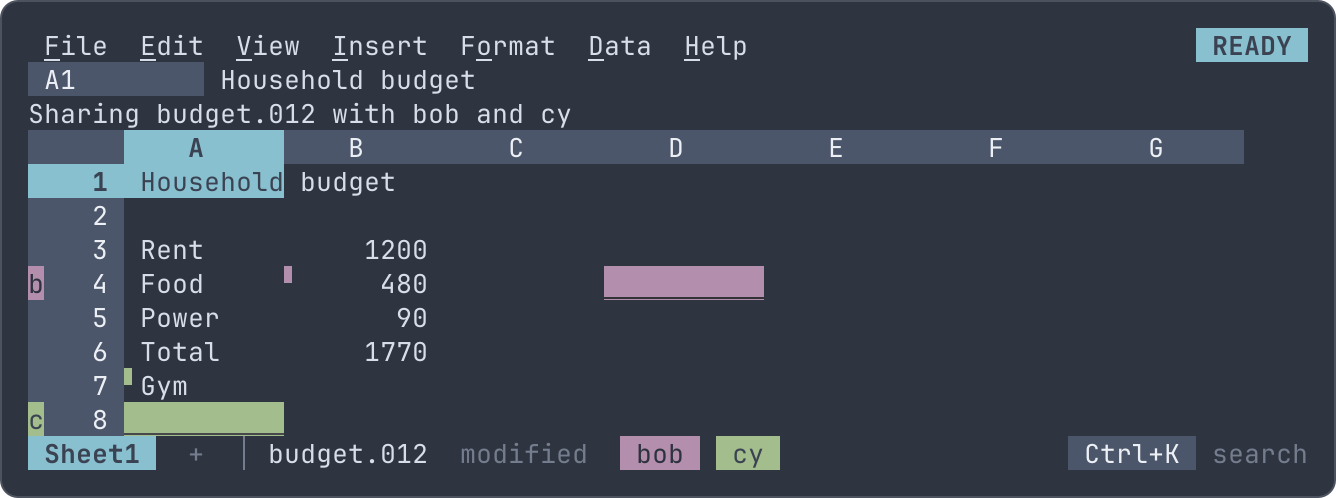
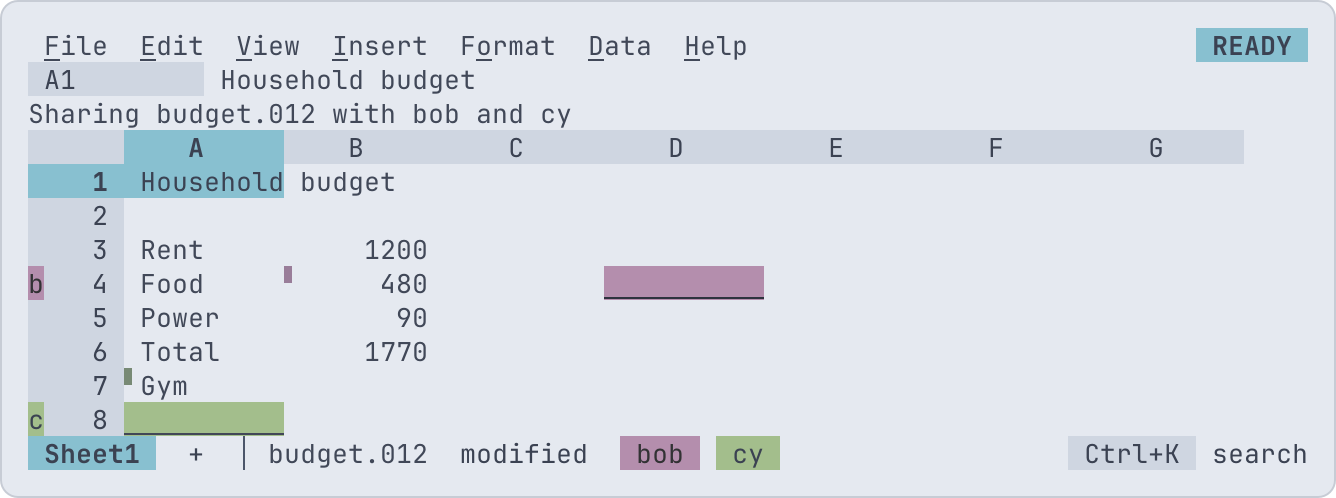
Who is where. Each other person in the room has a color: their
pointer's cell is drawn in it, double-underlined, their initial is on
that row's header, and their name is on the status line. A cell someone
else changed in the last 30 seconds has a ▘ in its corner, and the
context line on it says who changed it and how; on someone's pointer it
says who is there, and whether they're typing. File > Who's here
lists everyone with the cell they're on, and picking one goes there.
Editing together. Everyone edits (with --share edit). The server
takes each session's keys and clicks in turn, so every change is made
whole, in one order, through the one path every change takes in 012:
two entries in one cell leave the later one, and the one who typed
over the other's change is told, as is the one typing while someone
else changed the cell.
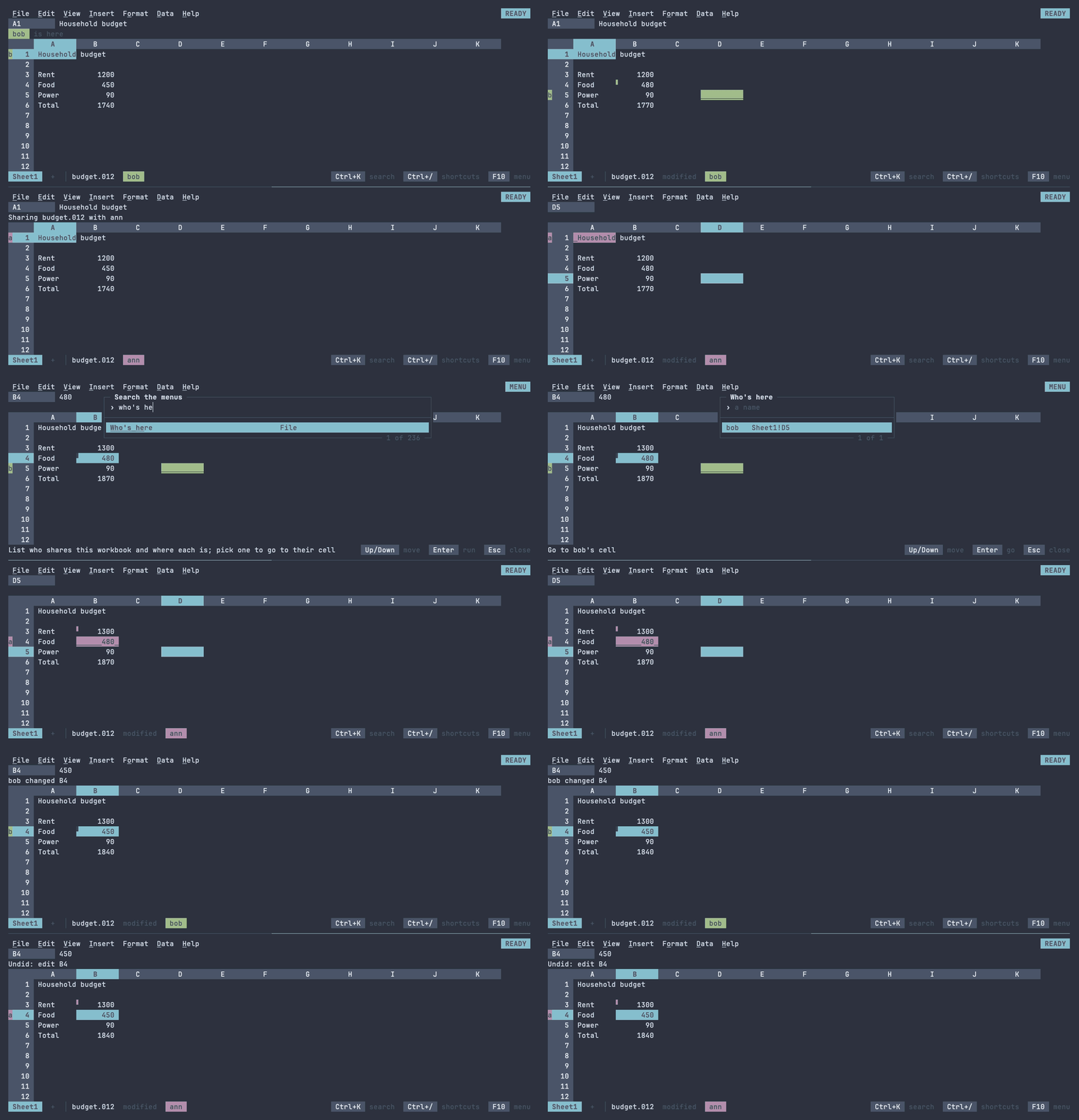
Undo is yours. Ctrl+Z takes back your own latest change, even when others changed other cells since: theirs stay. When someone changed the same cells after you (the same cells, widths, formats, names or rules, or rows and columns inserted or deleted on that sheet, or any change to the list of sheets), undo refuses and says who: take back yours by hand, or ask them. Redo is yours on the same terms. Formulas that read a cell you undid recalculate as usual.
One writer. With --share view, the first in a room writes and
the others follow: they move, scroll, select, copy and look around as
they like, but can't change the workbook, and the status line says who
writes. The writer hands writing over with File > Hand over writing;
when the writer leaves, whoever has been there longest writes.
Saving is the room's. Any session saves the one workbook to its
file, and the others' modified clears with it. Quitting while others
are in the room asks nothing: they still have the workbook. The last
one to leave is asked about unsaved changes as in a local 012, and the
last session to end without quitting keeps them (see
Unsaved work).
What runs is the room's. Files linked to the workbook are followed once for everyone, and notebook cells run once: any session may run or stop them, everyone sees them running and their outputs, and they go on when the one who started them leaves, until the last one does.
Agents. With sharing on, the server also listens for agents run by
its own user on its machine: 012 mcp --attach budget.012 joins the
room of a file someone has open, where the agent shows with a ◆ and its
changes wait as suggestions for anyone in the room to accept
(Live mode). The room closes when its
last person leaves, whatever agents are still in it.
Each session
Besides the shared workbook, every session is a separate 012 with
nothing shared but the process: its own cursor and selection, undo of
its own changes, clipboard, theme, JEV cache and terminal state. What
it learns about the terminal comes from the client: the window size and
its changes, the colors (from the TERM the client sends), the light or
dark background, kitty or sixel graphics, and the clipboard, which
Ctrl+C sets on the client's machine through OSC 52.
Macros can be recorded, run, renamed and deleted in a session, but not edited as scripts: that would start an editor on the server. A file's macros ask for trust once per session, since the session isn't the server's own computer, and scripts have no file, network or clock access in any case. A macro running in a shared workbook is one change: the others' keys wait until it ends.
Notebooks
A session opens notebooks and shows their
cells and saved outputs, but runs none of their cells: a cell is a
program on the server, with the server's user and every file it can
reach, well beyond the served directory. serve-shell = on in the
server's config lets sessions run them, as the user 012 serve runs as,
following the shell option as the local app does; a file's cells still
ask once per session before they run. Only turn it on when everyone holding an
authorized key may run programs on the server. The same setting decides
whether nu is started to highlight and check
the cell being written; without it, 012's own highlighting answers.
Unsaved work
A session that ends without the user quitting, because it was idle for
--idle-timeout, because the server is stopping (Ctrl+C, SIGTERM), or
because 012 stopped on an internal error
(whose report goes to the server's log), keeps its unsaved changes: the whole workbook is written to
.012-recovery/ in the served directory, and the
client's terminal is told where before the connection closes:
012: closed after 30m0s without input
012: unsaved changes kept in .012-recovery/budget-20260927-140203.012; open budget.012 again to restore them
The next session opening budget.012 (from File > Open or
ssh -t host budget.012) asks on the context line: Enter restores them
as unsaved changes to budget.012, D deletes them, Esc leaves them for
next time. Saving a restored workbook removes its recovery file, and
saving over a file that changed on disk still asks first. A sheet never
saved is kept as (untitled)-<time>.012 and offered when a session
starts on a new sheet.
In a shared workbook, only the last session in the room keeps them: one that ends while others remain leaves the workbook to them, and says so when it idled out. Restoring kept changes opens the room again on them, once nobody else is in it.
It stays small: nothing is kept for a workbook without changes or with
no cells, and only the newest three files per name are kept. The
directory is created 0700 and its files 0600, and it's hidden, so no
name typed in a session reaches it; only 012 itself reads and writes
it. A session whose client just goes away (a dropped connection)
keeps nothing, and neither does quitting, which asks about unsaved
changes as the local app does.
Files changed elsewhere
Saving over a file that changed on disk since it was opened or last
saved (another program wrote it, or a session with --share off) asks
first on the context line: Enter overwrites it, S saves under another
name, Esc cancels. The same check protects the local app from other
programs writing the file.
Limits
- An idle session is closed without saving over its file; unsaved changes go to a recovery file instead.
- A dropped connection loses unsaved changes, unless others share the workbook.
- Sessions in one room take turns: a long change (a sort of a million rows, a macro) makes the others wait for it.
- Each session holds its screen's buffers, about a megabyte, plus the sheets it opens; sessions sharing a file hold one workbook between them. A change reaches the others' screens within a frame. Fifty sessions typing at once get their frames as fast as ten do: see Bounds of support for the measurements.