title: "Macros" sidebar_position: 11
Macros
Macros repeat work: record what you do once, then run it again with a
key. They work like Google Sheets' Extensions > Macros, under
Data > Macros. A macro is a Starlark
script (a small, deterministic dialect of Python) saved in the .012
file, as Sheets saves Apps Script with a spreadsheet. Recorded macros are
scripts too, so you can read them, change them, or write your own.
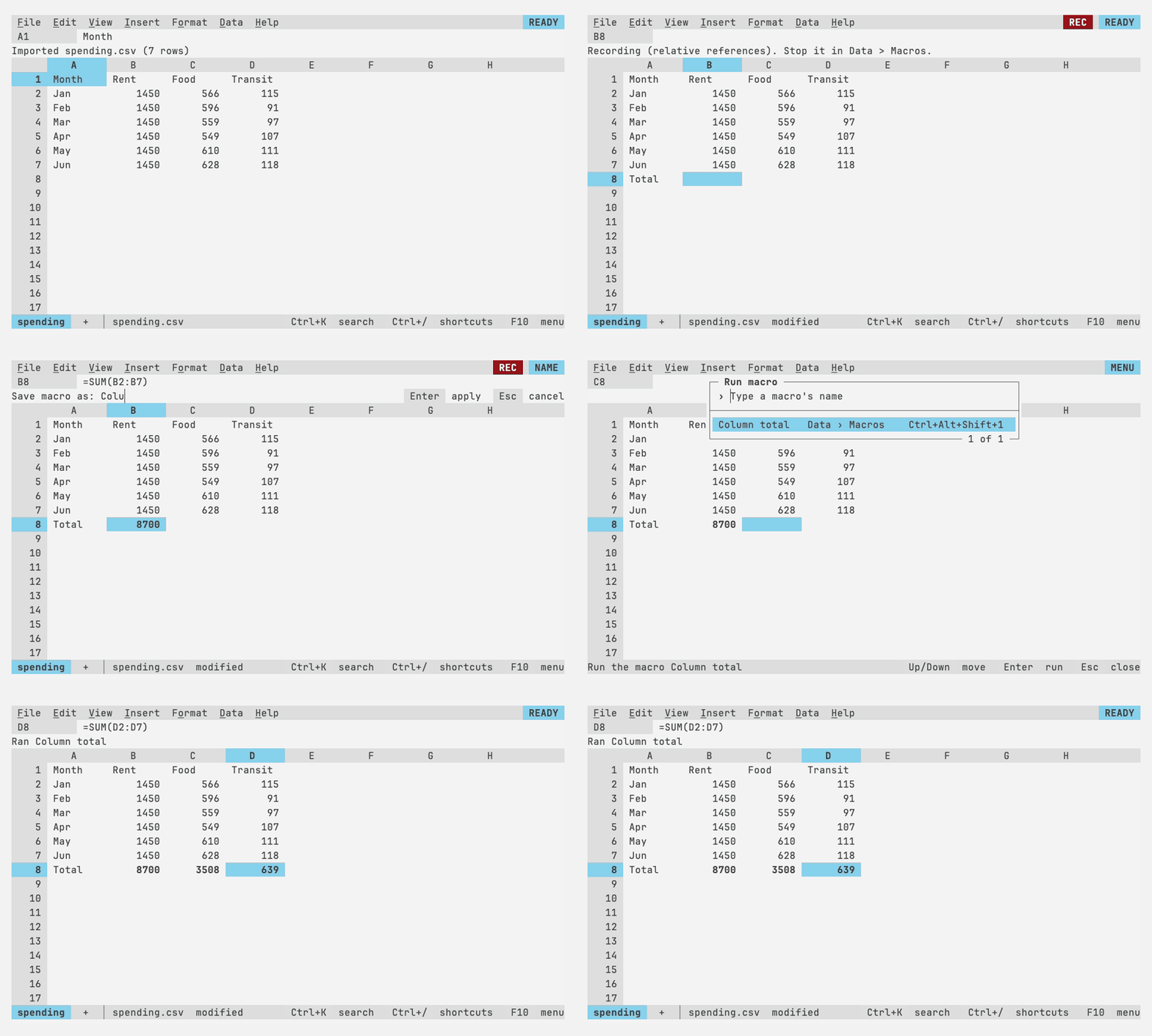
Recording
- Data > Macros > Record macro (or search the palette for "record").
RECappears beside the mode indicator, and the context line says what's being recorded. - Do the work: type entries, move and select, run commands from the menus, keys or palette, paste, drag the fill handle or a column border.
- Data > Macros > Stop and save recording. Name the macro on the context line, then give it a shortcut digit, or leave it empty. Esc at either question goes back to recording; Discard recording stops without saving.
Two ways to record, as in Sheets:
| Recorded as | Replays | |
|---|---|---|
| Record macro (absolute references) | select("B3"): the cells you selected |
On the same cells, wherever the active cell is |
| Record macro with relative references | move(0, 1), extend(2, 0): steps from the active cell |
From wherever the active cell is when you run it; formulas typed move with it, as in a copy, and Ctrl+arrows, Home, Ctrl+Home and Ctrl+End are recorded as jump(), since where they land depends on the data |
What gets recorded:
- entries as they're accepted (
enter("=SUM(B2:B8)")), including Ctrl+Enter over a selection (fill=True); - the selection, only when something acts on it: pressing Down five times
then typing records one
move(0, 5)(or oneselect()), so a replay doesn't depend on the size of the window; - commands that change the sheet, by id (
run("format.bold")), with the answer to the question they ask, if any (run("column.width", answer="15"),run("sheet.delete", answer="enter")); - pasted text (
paste_text(...)), the fill handle (fill(...)), column borders dragged or fitted (set_width(...)) and tabs dragged (move_sheet(...)); - what you choose in dialogs, as the command that opens the dialog with
your choices as its answer: the sort bar
(
run("data.sort_range", answer={"by": [{"column": "B"}], "header": True})), the filter picker's values and condition, find and replace, the chart editor, and the pivot editor, each as the dialog left things when you pressed Enter. These name columns, ranges and cells as they were, with either kind of references; - charts moved or resized, by keys or by dragging, as
run("chart.edit", answer={"chart": 1, "at": "F3"}), one call for a move made in steps; - rules added, edited, removed or moved in the conditional formatting and
data validation panels, as the commands that do it from a line of the
file (
run("format.conditional_add", answer={"ranges": "B2:B9", ...}),run("format.conditional_remove", answer=2)), and items picked from a dropdown, as entries.
What doesn't: undo, and changes made in the named ranges picker. Anything
like that which changes the workbook is noted in the script as a comment,
# Not recorded: undid: sort A2:C9, so the script never silently does less
than you did. Files, menus, help and other macros are never part of a
macro.
Running
- The shortcut, Ctrl+Alt+Shift+digit, in READY. Terminals without the
kitty keyboard protocol send it as Ctrl+Alt with the shifted symbol
(
Ctrl+Alt+!for 1 on a US layout), which works too. - Data > Macros > Run macro, a list of the saved macros.
- The palette (Ctrl+K): type the macro's name.
A run is one undo step: Ctrl+Z undoes everything the macro did. While it
runs, the mode indicator says CMD (as 1-2-3 did), keys and the mouse
wait, and Esc stops it; what it did so far stays, and Ctrl+Z undoes it.
When it ends, the context line says Ran Totals, or the last line the
script printed, or where it failed:
Totals:3:5: get: not a cell or range: ZZ Ctrl+Z undoes what it did
(Totals is the macro's name, 3:5 the line and column in its script.)
Every run has a limit of 10 million Starlark steps, so a script that loops
forever stops within a second or so with
stopped after 10000000 steps: does it loop forever?.
Managing
Data > Macros > Manage macros lists the saved macros with their shortcuts:
| Key | Action |
|---|---|
| Enter | Run the highlighted macro |
| F2 | Rename it |
| F3 | Change its shortcut: a digit, or empty for none |
| F4 | Edit its script in your editor |
| Ctrl+D | Delete it (Ctrl+Z brings it back) |
| Type | Search by name |
The first row, + Write a macro (also Data > Macros > Write a macro), names a new macro and opens a script for it in your editor.
Editing uses $VISUAL, then $EDITOR, then vi, with the screen handed
over until the editor exits; the script is saved when it does. If it has
a mistake, it's saved anyway and the context line says where
(Saved Totals, but it has a mistake at Totals:4:1: undefined: sett), so
you can fix it with F4. Sessions served over SSH don't start an editor:
their macros can be recorded, run, renamed and deleted, not edited.
Changes to macros (recording, renaming, deleting, editing) are undo steps and mark the file modified, like any edit.
Macros from other computers
Opening a file never runs its macros. The file remembers which computer its macros were made or trusted on (a random id kept in 012's config directory, the one Configuration describes). Running a macro from a file made elsewhere asks once, on the context line:
Trust this file's macros? Enter Run Esc Cancel
Enter trusts all of the file's macros for this session and, once the file is saved, on this computer. Sessions served over SSH have no id of their own, so they ask once per session.
Scripts can't read or write files, reach the network, start programs, or read the clock or random numbers: all they can reach is the functions of the scripting API. What a macro can do is what you could do with the keyboard in that workbook, which is why it asks before running someone else's.
Writing your own
+ Write a macro in Manage macros opens a new script in your editor. The scripting API lists the functions scripts call and the command ids they run.