title: Relay configuration audience: user
Relay configuration
Your relay's page at https:/ is the console. Sign in with your extension to see the ten owner tabs: People, Moderation, Rules, Identity, Connect, Data, Sync, Views, Health and Owner.
Everything on these tabs is also available to scripts as signed JSON-RPC calls (NIP-86). The page is a client of that same API.
People
The member list is one table. Each row is a pubkey, a role, an optional name, a note and how the person joined.
Three things read that table: the write rule, the signed roster your relay publishes and the NIP-05 names at you@<name>.bind.ws.
- Add a member by pubkey or npub. Give them a name and a note if you like.
- Invite with a link. Choose how long the link lives and how many people can use it.
- Limits, two inputs per member for the owner: a keep-for in days and a cap in kilobytes. See People and groups.
- Members invite members, the small form under the invites: how many hops from you the tree reaches and how many live invites each member may hold. Zero hops turns it off. See People and groups.
- Role is member or moderator, set from the selector next to the pubkey. What a moderator may do is in People and groups.
Removing a member ends their live subscriptions when reads are members-only.
Join terms are shown to people who open an invite link, and published at / as the relay's terms of service. The public directory switch decides whether / lists your members to visitors.
A moderator who signs in on the relay's page sees People and Moderation, nothing else.
Moderation
Keeping order. Reports never show in the feed.
- Reports filed against people or events arrive here. Resolve each one by dismissing it, deleting the event or banning the author.
- Ban a pubkey. Their events are refused and their open connections are closed. Tick erase and everything they wrote here, their profile included, and every file they uploaded goes too. The row action asks the same question; so does banning from a report.
- Hide after N reports. Set a number and an event reported by that many different people is hidden: not served, counted, synced, rebroadcast or shown on a page, until a moderator resolves the reports. Dismissing the last open report shows it again; deleting or banning makes it permanent. Reports on a person or a file never hide anything. Hidden events are marked in the reports table.
- Block an address. An IP address, v4 or v6, gets no socket and no write or read door; its open connections are closed. The page, the relay information and management stay reachable, so you can undo a block on your own address. Blocks travel with the exported configuration, so a relay you rebuild from the file refuses the same addresses.
- Log is the moderation history: every change made from this console or by script, and every NIP-29 moderation event that took effect, with when, who, what and to whom, newest first. Reads are not logged. The relay keeps the last 5,000 rows; Older pages back. Moderators see it too. Each row is also written to the host's logs as it happens.
- Recent events shows the feed with pin, delete and ban actions. Search above it looks through notes, articles and profiles by words, the same index clients use (NIP-50), up to 200 results; Clear goes back to the feed.
- Pinned is the group's pin list, up to 20 event ids or addresses in the order clients show them. Pin from the feed or by id; unpin from the list. Moderators may pin. The list is published as a record signed by the relay, so group clients see it.
Rules
Who can do what, and how much.
| Rule | Choices |
|---|---|
| Writes | anyone, members, members and their follows, only me |
| Open to anyone | kinds anyone may write whatever the write rule says, and whether anyone may reply to a member |
| Reads | anyone, signed in, members. One rule for everything the relay shows: events, counts, sync and search, pages and the feed, files and file listings, views and presence, signer traffic, and reports about files. What stays public whatever the rule: the information document with the owner's key and the relay's own key, the card, the terms, invite pages and the fuel meters. Tightening the rule closes the subscriptions it no longer admits. |
| Proof of work | minimum bits an event must carry, 0 to disable |
| Timestamp window | how far in the future an event may be dated |
| Query limits | max events per query, max subscriptions per connection, largest socket message in KB, 16 to 1,024 |
| Rate limits | events and queries per minute, per connection; an address gets four times that across all its connections |
| Upload size | largest file in megabytes, up to 95 |
| Kinds | allow list and block list by kind number |
| Blocked words | content containing one is refused; an entry written /like this/ is a regular expression, and a switch searches tags too |
| Features | search (prose, full, off), sync, counts, the discovery record, names, files, pages and the feed, signer traffic; each on or off |
An empty allow list means every kind. Blocks always win.
Members and their follows is a web of trust one hop wide: members and the owner may write, and so may everyone in their newest contact lists (kind 3) stored here. The web is rebuilt whenever a member's list arrives or the member list changes, and holds up to 50,000 pubkeys. Clients see the relay as restricted, and the group as closed, the same as the members rule.
Open to anyone loosens a limited rule for guests without opening it. List kinds, such as 7 for reactions, and anyone may write those. Switch on replies and anyone may answer a note (kind 1) or a comment (kind 1111) by a member or by you, one hop: a reply to a guest's reply is not a reply to a member. Bans, blocked words, kind rules, proof of work, fuel and the rate limits still apply to guests.
Blocked words is a list, one word or phrase per line, lowercased and matched anywhere in the content of any kind. An entry written / is a regular expression, matched case-insensitively, up to 200 characters; one that does not compile is refused when you save, with the reason. Also search tags matches the values of every tag as well, so a blocked hashtag or a blocked link in a tag is refused too. An event that contains one is refused with a reason that says so. You and your moderators are exempt, and moderators may edit the list. A pattern that backtracks badly slows every write to your own relay, and fuel bills that time, so keep patterns simple.
The per-address limit is what stops a client from opening many sockets to multiply its allowance. It also serves as the HTTP bridge's rate limit, which has no socket to meter. Address buckets live in memory and reset when the relay sleeps.
Features are the doors and the costs an owner may do without. Search indexes the prose kinds by default (notes, threads, comments, highlights, articles, wiki pages); full indexes every public kind with content, and off refuses search filters. A change applies to events from then on; the index is not rebuilt. Sync (NIP-77) reads the whole matching set per reconciliation, counts (NIP-45) keep sketches, the discovery record (NIP-66) is what crawlers find, names (NIP-05) publish members under the domain, files are the Blossom and NIP-96 doors, pages are notes and articles as web pages with the feed, and signer traffic is NIP-46 carried for anyone. What is off leaves supported_nips, answers 404 at its door, and is refused at the socket with an unsupported: reason. The bridge, groups, the roster, reports and management are not features: the console runs on them.
Three features add bounded services beside the relay feed. Sites is on by default and Mirror site files is on by default inside it: members can publish NIP-5A manifests, and the relay can verify and retain their files or fetch a verified cache miss from the manifest's sources. A site hostname is isolated from the relay's event and management doors. The NIP-5A static websites guide describes the origins and custom-domain choices. Marmot is off by default and carries signed KeyPackages and opaque MLS group envelopes, with the ordinary write, read, ban, rate and fuel rules still applied. GRASP Git hosting is off by default, needs open reads, and admits repository announcements, state and related NIP-34 events before exposing Git Smart HTTP; the GRASP-01 Git hosting guide lists its bounded repository and object rules. The marmot, marmot-members and grasp templates select these features for you. Marmot accepts public writes; Marmot members admits member publishers and requires account authentication for group envelopes. Both keep encrypted messages publicly readable, with recipient checks on gift wraps.
Presets
Above the rules form, one button per preset applies a template from the repository's relay-templates/ folder: writes, reads, the directory, the features, the kind rules and the keep-for rules together. Limits, identity, people and bans stay. Default restores open writes and reads, a public directory, every kind and indefinite retention. It leaves feature settings alone, so applying it after Quiet keeps the features switched off. A preset with shortcuts sets the Connect fold's shortcuts too (Connect, below); Default leaves them, as it leaves the features. Outbox is only you writing, anyone reading, private kinds refused. Inbox takes notes, replies, reactions, comments, reports and zaps from anyone and keeps them 90 days. Private is only you writing and only members reading, every kind, forever. Chat is the members-only group: private messages, chat and threads, directory hidden. Your own profile and lists always land, whatever the kind rules say. Names are cheap, so one name per role is the way to run all four.
Four more presets make single-purpose names: Media (members upload files; the only events accepted are profiles and Blossom server lists), Search replica (a read-only copy of another relay's searchable kinds, refreshed every six hours), Articles (long-form and profiles only, mirrored daily from a source if one is given) and DM inbox (anyone drops gift wraps, only members read). The replica presets take a source relay URL in the field next to the buttons; applying a preset again replaces the standing pull rather than adding one, and applying a preset with no source removes it. The pull appears in the Jobs table on the Data tab.
Quiet is a small private relay with every feature that costs or announces switched off: members write and read, and nothing else is on until you switch it on.
Home is one name as your home on nostr: members write, anyone reads, sites, files and Git hosting on, with notes, blog, bookmarks, sites, repos and a photo library shortcut only you see on the Connect fold. Only the shortcut is yours alone: anyone reads a Home relay, files included, and the members read rule is what closes the store.
Identity
Name, description, icon and contact appear in your relay's public information document, which clients read. The relay also keeps a profile of its own, signed with its own key, made from the name, description and icon, so it shows up like a person in clients that look one up.
Banner is a wide image for the same document. Posting policy and privacy policy are links to pages you host elsewhere; both must be https. Tags, languages and countries are short lists that tell relay directories what the relay is about: topic words, language codes such as en or pt-BR, and two-letter country codes.
The relay also publishes a discovery record for relay directories (NIP-66, kind 30166), signed with its own key under its wss:/ address: the NIPs it supports, whether reads need a signature, whether writes are restricted, proof of work and payment, the tags and languages above, and the kind allow and block lists, with the information document as its content. It is re-signed only when one of those changes. Anyone can read it with {"kinds":[30166],"authors":["<the relay's own key>"]}; the key is self in the information document.
Your own domain puts the relay under a hostname you control: add it, create the CNAME shown, Check until it reads live, Remove to take it down. At most three per relay, never part of the exported configuration. See Your relay on the web.
Your relay lists
One row per list that names relays: relay list, DM inbox, search relays and Blossom servers. Check finds your newest copy, Add this relay publishes a merged list with this relay first and Remove this relay publishes it without. See Getting started.
Connect
The app shortcuts on your relay's page. Anyone who opens the Connect fold there sees the relay URL with its copy button, then each shortcut as a tile: an icon, a title, the app and where it runs, one sentence, an Open button, a copy button when the app takes a command or an address, a QR button that shows the handoff link as a QR code for a phone, and More for the app's other links. The Blossom, names and bridge addresses and the Git clone example sit under Connection details below the tiles. A visitor sees the public shortcuts; someone who signs in sees the rest you let them see, with the links that need their own key filled in.
- Shortcuts is your list, in the order the fold shows it: one row per shortcut with who sees it (anyone, anyone signed in, members, only you), Edit for a title of your own and the template's inputs, move up and down, and remove. Save, at the top of the list, lights up while there is something to save and writes the whole list. Who sees it hides the shortcut and nothing else: the read rule still says who may read what the shortcut leads to. Until you save a list, the fold shows notes, find me here and the group; a saved empty list shows nothing.
- Library is one card per template with Add. A template that needs a feature you switched off says so, and its shortcut stays off the fold until the feature is on.
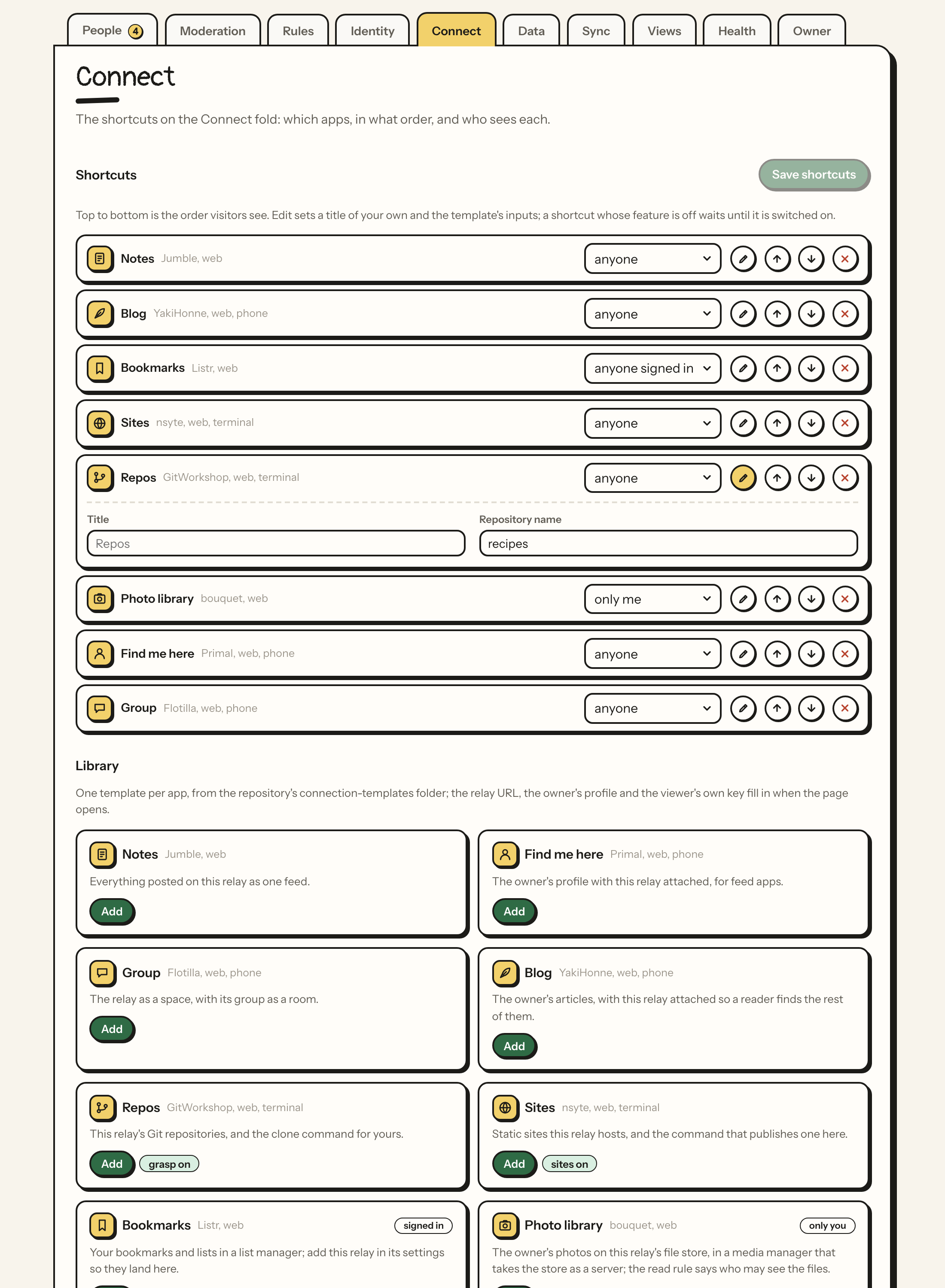
The shortcuts travel with the exported configuration as its connections section, and a preset may set them (Presets, above). The templates are files in the repository's connection-templates/ folder, and its README is the catalog; Connection templates says how one is written and how to add one.
Data
What is here and what leaves.
-
A bar shows bytes by kind. Totals list events, files and index overhead.
-
The By kind table has one row per kind present, with a count, size and oldest event.
-
Keep for sets a retention rule in days. Events older than the rule are refused on arrival and swept once a day. Leave it blank to keep forever. The everything else row sets a default for kinds without their own rule.
-
Purge deletes a kind older than a number of days, now. Zero means all of them.
-
Kinds marked required are never expired or purged: profiles, contact lists, relay lists, zap receipts and the roster. The relay depends on them.
-
Files lists uploads with sizes and a delete button.
-
Import a file takes a JSONL of events, one per line, such as a dump or a strfry export, or a JSON array, up to 64 MB, and stores what checks out as a job: signatures are verified, bans and kind rules apply, the write rule does not. The Jobs table shows stored, skipped and already-here counts. The file counts as a file for fuel until the job is done, then it is deleted.
-
Dumps writes every event as one JSONL file daily or weekly and keeps the newest few. Dump now writes one on the spot. Downloads are signed requests. See Data and names.
Sync
What moves in and out. Jobs spend awake time, which fuel counts.
- Jobs is work the relay does on its own in small rounds: pulls, standing mirrors, fetch my history and rebroadcasts, with run-now and remove per job. See Data and names.
- Fork this relay leases a new name, copies this relay into it and reserves the claim for a key. One fork an hour. See Data and names.
Views
Records the relay computes and signs from its own data.
- Views lists the records the relay signs from its own data, profiles, relays, calendar, moderation, articles, zaps and presence, with how it runs, who may read it, when it last ran and how many rows that wrote. Each has a choice: off, on write (a burst republishes once, and daily besides), hourly or daily; presence is on or off. Off takes the record down at once. A view's own trigger is the default; a daily view that never moves costs nothing, an hourly one costs a fingerprint check. Open shows the record itself. See Your relay on the web.
Health
Time since the last event, open connections, fuel status and a breakdown of kinds over the last 30 days. Below it, the usage meters and the list of zaps received.
Notifications. Five switches, all off until you turn them on: a report arrives, fuel runs low, a pull finishes, a note every week on how the relay is doing, the handover clock is running (this one switches itself on when you name an heir). The relay writes you a NIP-17 private message with its own key, sealed and gift wrapped, stored here as your inbox and pushed to the relays in your kind 10050 when this relay holds one. Send a test message proves the path end to end. Only the owner can read these; the catch-all keep-for rule leaves gift wraps alone, though a rule set on kind 1059 itself still applies. Fuel is reported once when it turns low and then once a day while it stays low.
Owner
The relay as a thing you hold.
Export configuration downloads rules, identity, members, bans, address blocks, kind rules and retention as one file. Import replaces those lists on any relay you own. Events, files and the owner are never touched.
Transfer ownership hands the relay to a member you pick. You stay on as a moderator. The relay's key, events, files and fuel do not change. You type the relay's name to confirm.
Delete relay removes everything and returns the name to unclaimed. You type the relay's name to confirm.
If I lose my key
Name a member as your heir and a delay of 90, 180 or 365 days of silence. Past it the relay warns you for 30 days, then hands itself to the heir. See People and groups.
Relay push
Relay push is off by default. Under Features, enable it and enter callback
origins approved by your host operator. Members register their own callback
paths using signed kind 30390 events; callback work costs fuel. The
features.push, pushCallbacks and letteredNips settings travel with relay
configurations. Push requires mixed numeric and lettered NIP advertisements,
which some older clients reject. See NIP-9a relay push
and NIP-11 identifier compatibility.