title: "Decimal arithmetic" sidebar_position: 5
Decimal arithmetic
Like Sheets and Excel, 012 computes in binary floating point, so
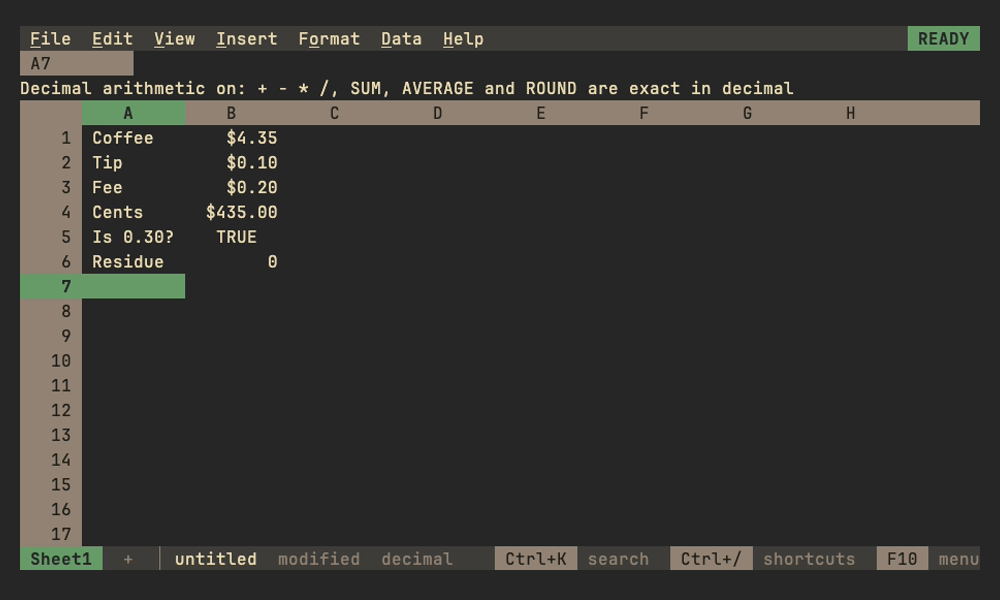
=0.1+0.2-0.3 is 5.551E-17 rather than 0 and =INT($4.35*100) is 434.
Comparisons look only at the 15 significant digits a cell shows, as in
Sheets, so =0.1+0.2=0.3 is TRUE, but =0.1+0.2-0.3=0 is FALSE. File > Settings >
Decimal arithmetic (or search the palette for "decimal") switches the whole
file, every sheet of it, to decimal math for money. The status line then says
decimal, the menu shows a check mark, and the setting is saved with the
file and can be undone.
| Computed in decimal | Stays binary |
|---|---|
+ - * / and postfix %; SUM, AVERAGE, PRODUCT, SUMIF, SUMIFS, SUMPRODUCT; ROUND, ROUNDUP, ROUNDDOWN, TRUNC |
^, SQRT, statistics, finance, dates and everything else |
Values are still stored as doubles. Each decimal step reads its inputs as the
shortest decimal that round-trips (what the cell shows), computes exactly
(division to 34 significant digits) with
apd, and keeps the double nearest the
result, so comparisons, lookups and formats see 0.3 rather than
0.30000000000000004. Division still rounds: =1/ is 0.9999999999999999,
as in any decimal system. Displayed numbers are already rounded to 15
significant digits, so the setting matters for comparisons, INT/MOD-style
truncation and residues such as =1.1-1-0.1. Older builds ignore the setting
and compute in binary.